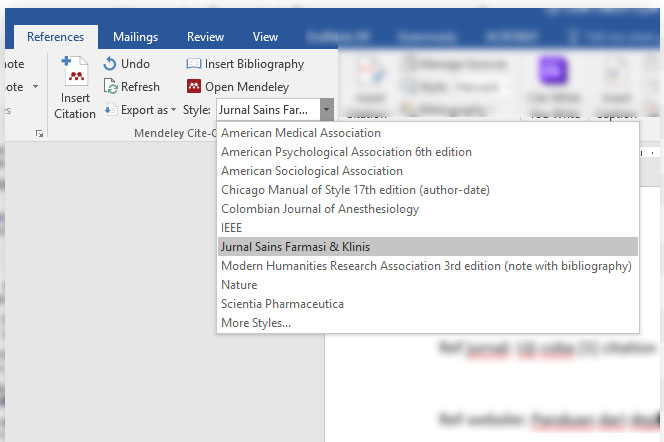
The citation style for JSFK is already registered in the Mendeley database
Posted on 2019-12-19Good news... The JSFK editorial team has successfully created and registered the JSFK citation style in the Zotero repository and Mendeley database. Therefore, authors can prepare their manuscripts by utilizing the citation and reference features specifically designed for JSFK using the Mendeley application.
Steps to use the JSFK citation style with the Mendeley application:-
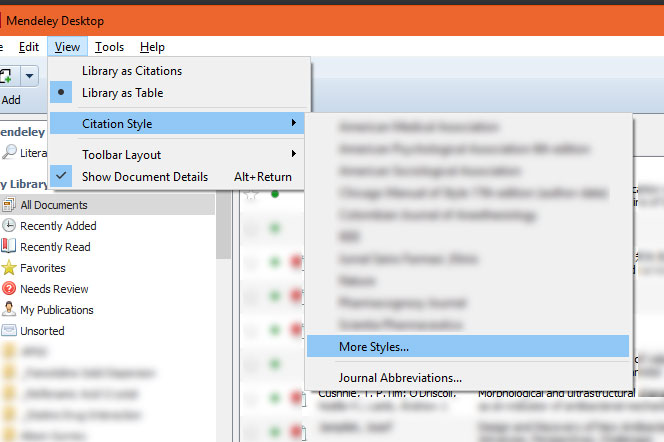
In the Mendeley application, go to View > Citation Style > More Styles...
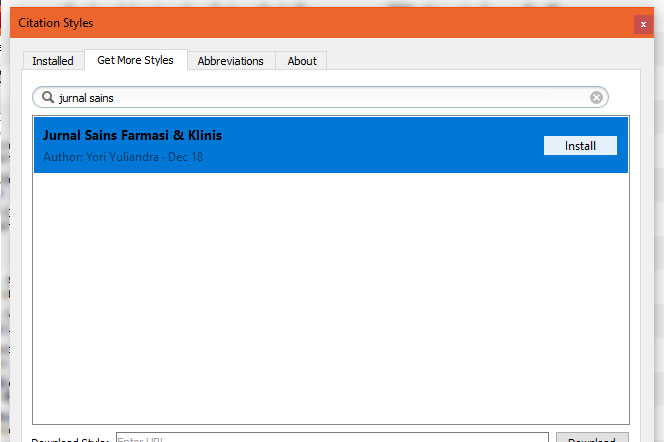
2. In the Citation Styles dialog box that appears, open the Get More Styles tab. Type the words "Jurnal Sains" in the search field. From the search results, click on Jurnal Sains Farmasi & Klinis and click the Install button.

3. In the same dialog box, go to the Installed tab. In the list that appears, click on Jurnal Sains Farmasi & Klinis and click the Use this Style button.
4. To ensure that the JSFK citation style is active, open a manuscript/application in Microsoft Word. In the References menu, and from the drop-down Style menu, select Jurnal Sains Farmasi & Klinis.